

The Best Linux Distros 2026
I have been using Linux for a very long time, since around 2008 - I recall installing Ubuntu on an old PC that was given to my parents, which I had an AMD K6 CPU, around 400Mhz or so, with not a lot of RAM. This was my entry point to Linux, I certainly didn't use it as a daily driver it was way too slow. I had to install a different desktop environment, FVWM Crystal, which looked nice and was low on resources. Opening the browser took a minute or so, but the OS was usable enough.
Since then I haven't really settled on a Linux distribution that I can use as a daily driver, until closer to today. I kept trying different distros and running into issues or changing my mind about UI design preferences. When I needed to get work done, I used Windows or macOS.
I have a very unique setup. I connect my Framework 13 laptop over USB-C to a 4K 160Hz monitor, both have to use fractional scaling (of the UI) otherwise I will get a headache as everything is too tiny. This rules out all X11 desktops, since X11 treats multiple monitors as a single monitor, and a single refresh rate. I have a 160Hz display and my laptop is 60Hz, X11 would force it to be all 60Hz.Also you can't mix fractional scaling on different displays.
So Wayland comes in. The only major desktop environments that support Wayland currently are GNOME, KDE, COSMIC and Pantheon from ElementaryOS. If you wanted any other DE (such as Cinnamon, XFCE, Budgie, MATE) the support is either not there or coming eventually.
But there is an issue that I've rarely heard talked about with GNOME, which is when you enable fractional scaling and want to play games on Steam. Ultimately, many games default to a resolution that is higher than the monitor, and some more modern games won't let you change the resolution. The hack that GNOME does is that it only scales the resolution by an integer, so at 4K it renders at 2x 1440p (5120×2880), then downscales to 4K. Many games just see the 5120×2880 resolution and run at that, which if you're playing a high end AAA game, will reduce performance and in many cases the UI will look smaller. You can fix this issue with gamescope, a tool made by Valve to coerce games into different resolutions and refresh rates, but it requires manually setting up for each game, which is quite tedious.
So that just leaves KDE, COSMIC and ElementaryOS. ElementaryOS is nice, but I have an ongoing issue, which is that I often need the system tray. Before it was Nextcloud, now I use Seafile, which explicitly runs in the system tray. If I run Seafile on ElementaryOS, when I close the sync window, there is no way to know if it is running or not. Not a good feeling when you need your files to be syncing. So I am passing on ElementaryOS for now until I happen to not need the system tray.
Now that leaves KDE and COSMIC DE. KDE is quite good really, it has many features, something for everyone. But my main issue with KDE is that I often end up in a tinkering trap. I want to make KDE look different, eg more like Windows 11 or macOS or GNOME. And with a different theme. I went down that rabbit hole recently, but ultimately concluded that I am not a UI designer, I can make it look better but I'll never be happy if I am designing my OS's UI theme. I think what KDE needs is some kind of desktop application or script that manages installing custom themes. I have seen some nice KDE desktops by users out there, but it'd be nice if you could just click Install and now you have the exact setup that someone else has. No need to follow a YouTube video. So I may come back to KDE one day, but that just leaves one desktop..
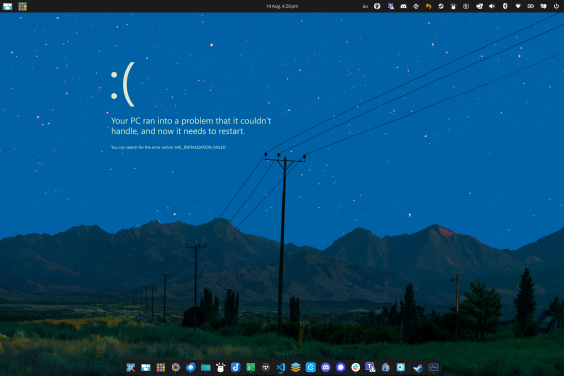
COSMIC DE. It has only been out of beta for less than 12 months, and is only up to version 1.5 as of 2 weeks ago. But this seems to be the desktop environment I am settling on. I can configure it to look similar to GNOME, with a light UI theme and dark panel/dock theme. So far I have had very few issues with it. One time the entire desktop crashed and everything closed. But to be expected with new software, a few quirks. The amazing thing is that gaming with fractional scaling works so I can run a game on my main 4K 160Hz display at normal 3840x2160 resolution, not 5120×2880 which is what GNOME would likely set it to. The UI is fine, not as nice as some Linux desktops you may see out there on the net, but does feel like a nice transition from macOS. Another change I had to make was the terminal. I prefer the dark theme for the terminal, and for some odd reason you can't have a dark terminal with a light UI theme. So I am using Ptyxis instead.
Depends what your display requirements are
If you have a simple single display setup, say 1080p at 100% scaling, you can use any Linux distro that you want, take your pick. But if you use fractional scaling for a higher resolution monitor, then if you play games, that rules out GNOME, otherwise if you don't play many games, GNOME is quite good for helping to improve focus while working. If you don't mind the UI of KDE, that is very subjective, then KDE is pretty great, out of the box it's a nice alternative to Windows 10 for those migrating from it. ElementaryOS may be more suitable on older Intel MacBooks. For me, the perfectionist, COSMIC works the best.
Why does KDE and COSMIC work?
KDE lets applications set their own resolution, whereas in GNOME it is forced to the upscaled resolution. Importantly, XWayland applications, which are traditional X11 applications running in Wayland, which is most games on Steam. COSMIC does the same as KDE, each XWayland application sees the default display resolution. One day, when Steam ships Wayland support for Proton, this will fix the gaming issue in GNOME, but it is not here yet. When it is, then it will be more the case of yes, you can use pretty much any Wayland distribution, which will eventually include Cinnamon, Budgie and XFCE (XFCE supports Wayland now but fractional scaling isn't implemented).
COSMIC DE screenshot
Page views: 2169